A subdomain is a separate site under your domain, an alias shows your main site on another domain, and an addon domain hosts another website in the same cPanel account.
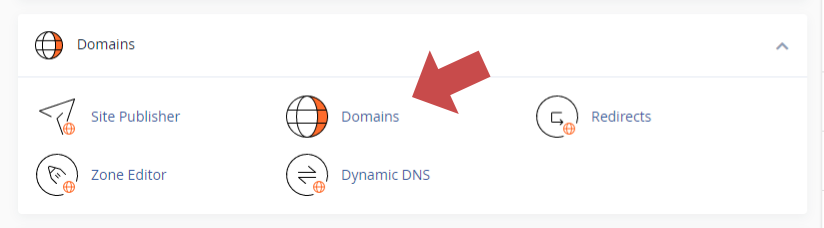
In cPanel, you manage all three in one place: Domains › Domains. To open cPanel, log in to the 2MHost client area, go to Hosting accounts and click the cPanel button of the hosting account.
Subdomain, alias and addon domain compared
This table compares the three types by example, content and typical use.
Type | Example | Own content? | Use it when |
|---|---|---|---|
Subdomain |
| Yes | You want a separate section or site under your main domain |
Alias |
| No, shows the main website | You want two domains to show the same website |
Addon domain |
| Yes, with its own email | You want to host another website in the same hosting account |
What is a subdomain?
A subdomain is a secondary website with its own content that uses the domain of your main website. Subdomain names look like private.example.com or help.example.com.
You can create subdomains in cPanel at no extra cost in all 2MHost web hosting packages.
Create a subdomain in cPanel
This example creates the subdomain support.2mhost.com in the cPanel account of 2mhost.com.
- In cPanel, open Domains › Domains.
- Click Create A New Domain.
- Enter the full subdomain name in the Domain field, for example
support.2mhost.com. - Uncheck the Share document root checkbox, so the subdomain gets its own folder.
- Click Submit. The subdomain appears in the list of domains.
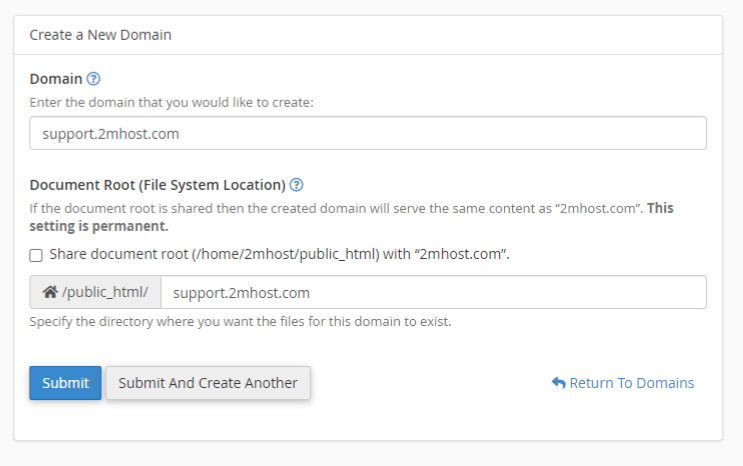
cPanel creates a folder called support.2mhost.com inside public_html of the main account. Upload the files of the subdomain to that folder.
What is a domain alias?
A domain alias is not a separate website. It shows the main website of your hosting account on another domain, and the visitor keeps seeing the alias domain in the address bar.
Use an alias when you want two domains to show the same website, for example when example.net should show the website of example.com. We use 2mhosting.com as an alias of 2mhost.com.
You can create aliases in cPanel at no extra cost in all 2MHost web hosting packages.
Create a domain alias in cPanel
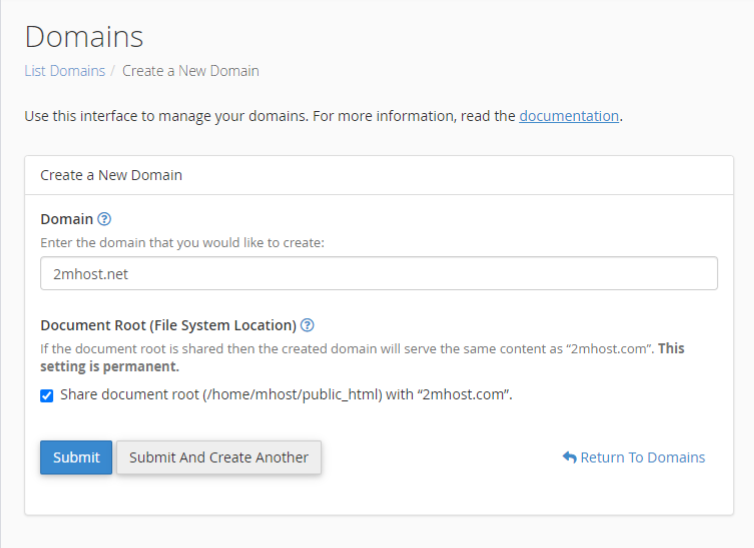
This example creates the alias 2mhost.net, which loads the 2mhost.com website.
- In cPanel, open Domains › Domains.
- Click Create A New Domain.
- Enter the alias domain in the Domain field, for example
2mhost.net. - Leave the Share document root checkbox selected. This makes the alias show the main website.
- Click Submit. The alias appears in the list of domains.
Note: An alias or addon domain only works after it points to 2MHost. See how to point your domain to 2MHost.
What is an addon domain?
An addon domain lets you host several websites in a single cPanel hosting account, each with its own domain, content and email. The number of websites a hosting plan allows is the number of addon domains you can create, plus the main website.
Addon domains are available in Ready packages and above.
Create an addon domain in cPanel
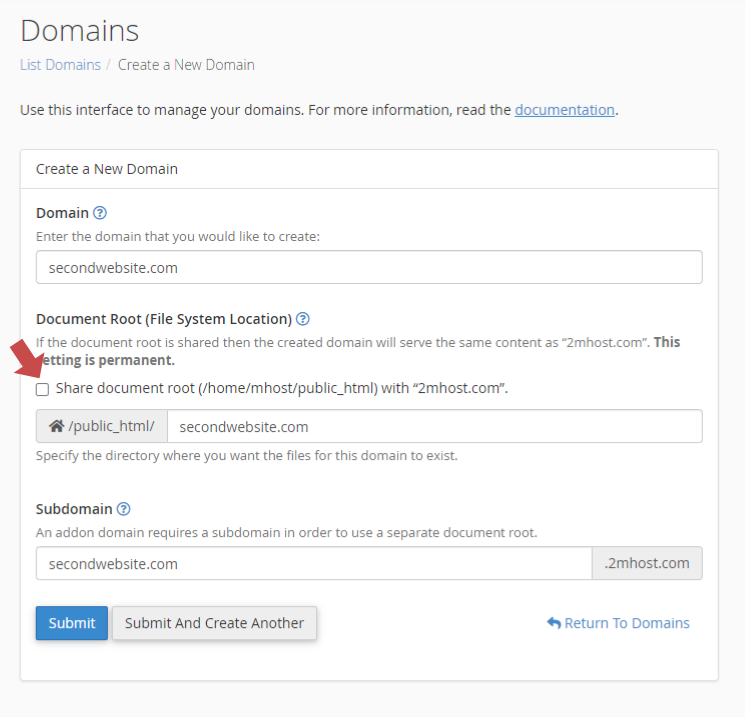
This example adds secondwebsite.com as a separate website in the same hosting account.
- In cPanel, open Domains › Domains.
- Click Create A New Domain.
- Enter the new domain in the Domain field, for example
secondwebsite.com. - Uncheck the Share document root checkbox, so the website gets its own folder.
- Click Submit. The addon domain appears in the list of domains.
To add mailboxes for the addon domain, see how to create an email account in cPanel.
What you cannot do with addon domains
- You cannot convert a separate hosting account into an addon domain of another account. Separate hosting accounts cannot be combined into one larger account.
- You cannot turn the main domain into an addon domain, or an addon domain into the main domain.
Should you use addon domains or separate hosting accounts?
We recommend a separate hosting account for each website, for three reasons:
- Shared resources: addon domains share the disk space, RAM and CPU of the hosting account, so one busy website can slow down the others.
- No separate cPanel: addon domains do not get their own cPanel login, which makes websites harder to manage when they belong to different owners.
- Small savings: a separate hosting account costs little compared with the extra management work of several websites in one account.
- SiteSpark: Our new website builder publish only to the main domain of the hosting account.
Separate hosting accounts can also be handed over later. See how to transfer hosting account ownership between 2MHost users.